The agentic email client. Crafted for speed and collaboration with humans and AI.
Maze is a local-first email client written in Rust. It renders on the GPU, keeps your whole mailbox encrypted on disk, searches it instantly, runs AI agents in a sandbox next to your mail when you turn them on, and gives your scripts scoped access through the mazemail command line.
Apple Silicon · Intel · macOS 13 or later · updates itself. Pre-alpha: it reads, writes and runs agents; expect rough edges.
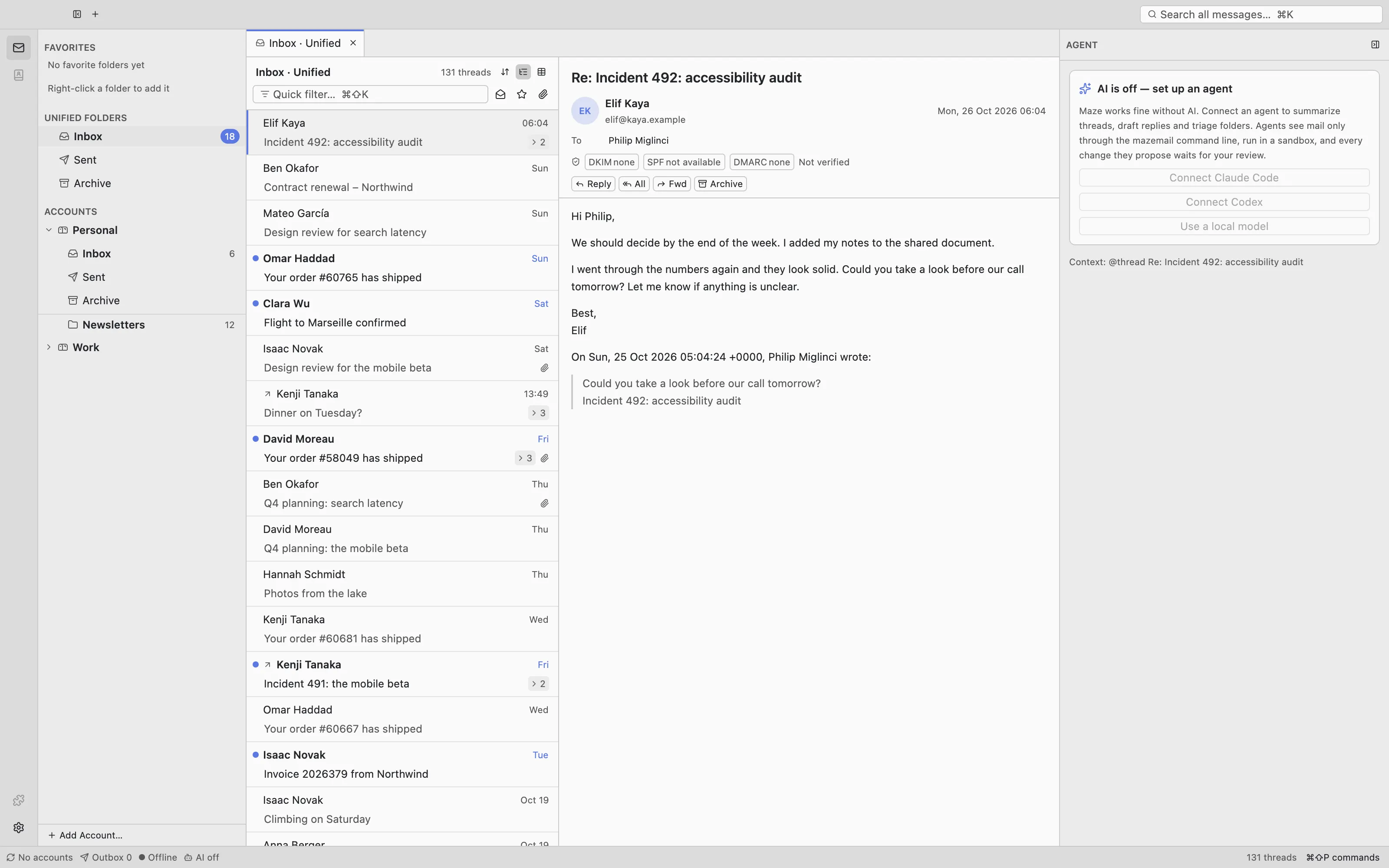
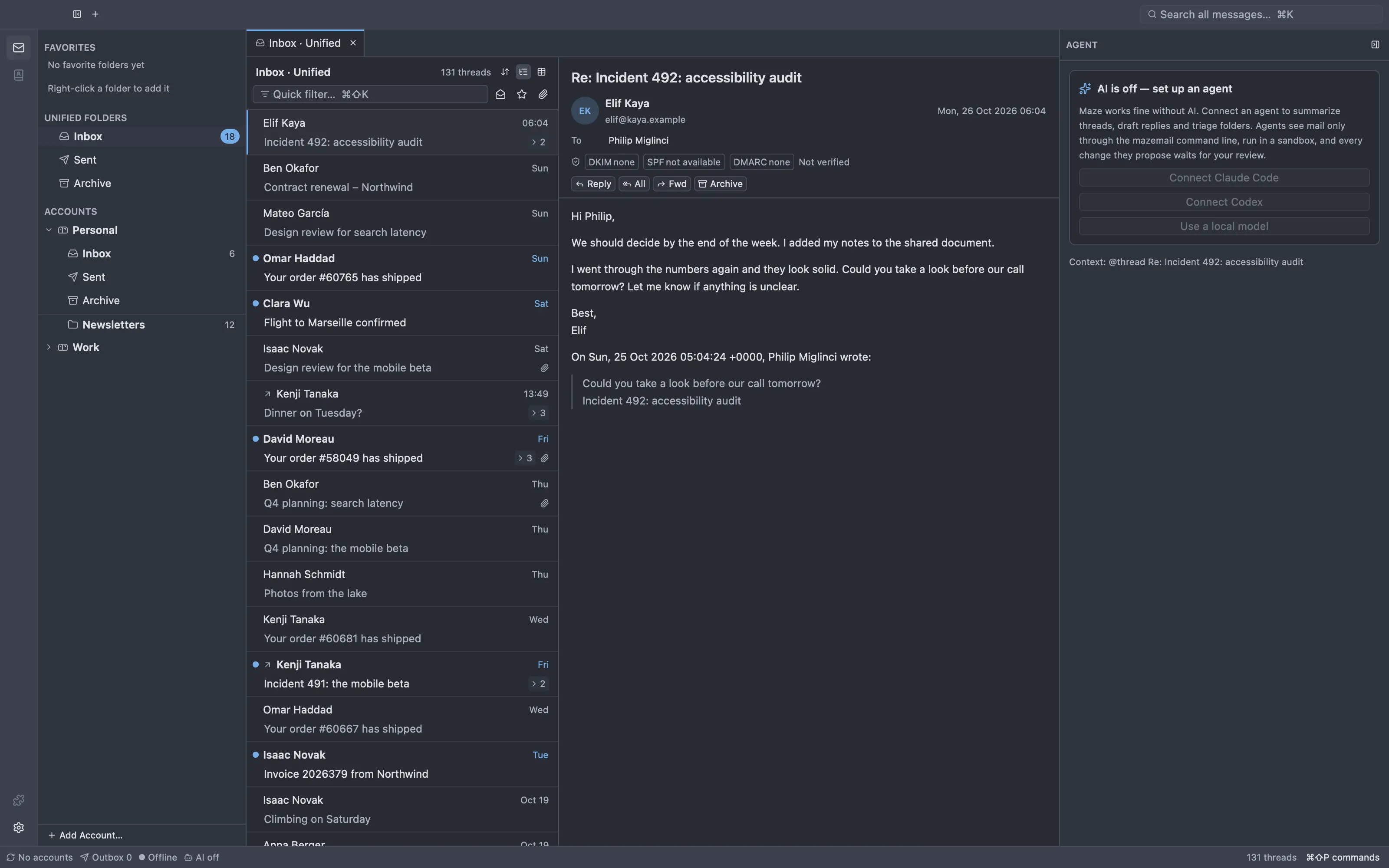
Demo mailbox. On the right, the agent column, where Claude Code, Codex, Gemini CLI, Cursor or pi help once you turn AI on.
The layout you know
Nothing to relearn.
Folder pane, message list, message. Cards or a table. Quick Filter and global search. Thunderbird's keyboard shortcuts, plus a command palette for everything else.
The layout you know
Unified folders, favorites and accounts on the left, threads in the middle, the message on the right: a calm reader view, or the original HTML as designed, laid out by a built-in engine that never runs scripts and blocks remote content until you allow it.
Your shortcuts
nnext unread
aarchive
shiftmmove to folder
sstar
rreply
mtoggle read
cmdshiftkQuick Filter
cmdksearch everything
cmdshiftpcommand palette
F8message pane
Bring your mail
Add IMAP, Gmail and Microsoft 365 accounts and sync live with IDLE and QRESYNC, or import a Thunderbird profile (accounts, identities, tags, saved searches, address books). mbox and Maildir files are uploaded into a folder of your account.
New messages, replies and forwards open in tabs, with panes and splits like Zed's: keep the Inbox on one side and a draft on the other. Maze opens your tabs and splits again after a restart.
Markdown in, normal mail out
Write in Markdown; Maze sends it as plain text and HTML. Each draft gets a two-word name like brave-otter and is saved encrypted as you type. Replies pick the identity the message was sent to.
Sent once, filed in Sent
SMTP with your password or Google and Microsoft sign-in. Offline, a message waits in the outbox; Maze records what the server accepted, so even a crash never sends a message twice. A copy lands in your Sent folder.
Tabs and splits
Mail views, single messages and drafts each get a tab. Drag a tab to the edge of a pane to split it, or press cmd\. cmdbhides the folder pane.
Maze is built on GPUI, Zed's UI framework: no web view for the UI, virtualized lists, and no work on the UI thread. Opening a folder, scrolling a hundred thousand threads or searching all of them reads from the local store.
~130msstart to the message list
Measured from the app bundle on Apple Silicon (warm start; first launch after boot ~370 ms). Budget: under 300 ms.
1Mmessagesin one folder, opened in 6 ms
First 200k thread keys of a 1M-thread folder in 6 ms, all 1M in 36 ms, encryption on.
~12mssearch p95 over 1M messages
Gmail-style queries over the encrypted Tantivy index, 1M-message benchmark. Budget: under 100 ms.
~123MBthe whole app, one binary
Stripped macOS release binary with the embedded Servo engine for original HTML mail (ADR-020); about 49 MB without it. The UI itself is native GPUI.
Measured on an Apple Silicon Mac with release builds and encryption on. The budgets are hard targets from the design spec; the benchmarks live next to the code in the repository.
Private by design
Encrypted at rest. Nothing phones home.
Maze keeps a full copy of your mail, so it encrypts all of it with a key that never leaves your keychain. A copy of your data directory, a backup or a synced folder is useless without it.
The database (SQLCipher, AES-256), message files and caches (XChaCha20-Poly1305) and the search index, each with its own subkey of one 256-bit master key.
The key stays in the keychain
The macOS keychain, or the Secret Service on Linux. Programs that don't go through Maze see only ciphertext.
No telemetry
No analytics, no accounts, no cloud. The updater fetches a signed manifest with a plain GET and sends nothing about you. Tracking pixels stay blocked. Agents are off until you turn them on; then they reach their model provider.
Agents in Maze
Your agent, next to your mail. Off until you say so.
The agent column runs Claude Code, Codex, Gemini CLI, Cursor, pi or your own agent over the Agent Client Protocol, with the selected thread as context. AI is off for every account until you share one with agents.
Sign in, pick a model
Maze installs the agent and keeps it up to date. Sign in or paste a key right in the column, then pick the mode, model and thinking effort the agent offers.
In a sandbox
Every agent runs in an operating system sandbox (Seatbelt on macOS, bubblewrap on Linux). It can't read Maze's store or your home folder and reaches mail only through the mazemail CLI, with a token for the accounts you shared.
Agents propose, you decide
By default, an agent's archive, move, tag and flag requests become proposals at the top of the column. Accept or reject each one with y and n, or all at once.
The mazemail CLI is the same program as the app. It never opens your store: it asks the running Maze over a private socket, and every request needs a token you approved in Maze.
Profiles: read-only, triage or writer, limited to accounts and folders, with a lifetime.
Approvals: Maze shows which program asks before it gets a token, an import or an export.
Proposals: a triage token's archive, move and tag become proposals you review in Maze.
Headless:mazemail --headless runs Maze without a window, for scripts and servers.
JSON everywhere: stable ids and output shapes, documented for agents.
$ eval "$(mazemail login --profile triage --label claude --ttl 2h)"
waiting for approval in Maze…
$ mazemail search 'from:anna has:attachment after:2026-09-01' --limit 2
ID        DATE                       FROM                         SUBJECT
m_8f3a2c  2026-10-21T09:14:00+02:00  Anna Berger <anna@acme.dev>  Q4 planning
m_7d10e4  2026-10-02T16:40:12+02:00  Anna Berger <anna@acme.dev>  Offsite agenda
$ mazemail archive t_19bd --json
{"affected":["m_8f3a2c"],"outcome":"proposed","proposal":"p_2c41"}
# a triage token proposes; you decide in Maze
Open source
GPL, on GitHub, built in the open.
Maze is free software under the GPL-3.0-or-later. The design decisions are written down as ADRs, the plan is public, and every change lands as a reviewed pull request.
One binary for the app, the CLI and headless mode. No Electron, no web view for the UI.
Standard formats, no lock-in
IMAP to your servers; mazemail export writes mbox or Maildir whenever you want out.
Status
Pre-alpha: a full client, still rough at the edges.
Maze reads, writes, searches and triages mail and runs agents next to it, but it isn't a daily driver yet. It keeps all mail in your IMAP accounts, so another mail client keeps working alongside.
Works today
IMAP, Gmail and Microsoft 365 accounts with live sync
Thunderbird import, mbox and Maildir upload to IMAP
Encrypted store and Gmail-style search
Reader and original HTML view, with DKIM, SPF and DMARC results
Archive, move, delete, tag, flag, mark read, with undo
Compose, reply and forward in tabs, SMTP sending with an outbox
Tabs and splits, restored after a restart
Agents in a sandbox, with proposal review
The CLI and headless mode with scoped tokens
Background updates with rollback
Next
Drafts on the server, send later and undo send
Address autocomplete and spell check
Filter rules, including imported Thunderbird filters
Notifications for new mail
Settings window and recovery key
Linux packaging, and the original HTML view on Linux